Solflare Widgets bring your wallet and market insights to your phone’s home screen. Stay on top of what’s happening without opening the app.
You check crypto all the time.
Prices, portfolio balance, market moves — for many users, it happens dozens of times a day. Until now, every one of those quick checks meant unlocking your phone, opening the app, and navigating to the right screen.
Now you don’t need to open the app to do it.
What are Solflare Widgets?
Solflare Widgets are home screen widgets for iOS and Android that give you instant access to the information you care about most (and a quick path to act on it).
Instead of opening the app every time, you can now follow prices, check your portfolio and see what’s moving in the market right from your home screen.
When something catches your attention, a single tap takes you exactly where you need to go inside Solflare.
Three widgets, one connected experience
Solflare Widgets are designed around how you actually use crypto day to day. Quick checks, followed by quick actions.
Price tracker
Follow the tokens you care about directly from your home screen.
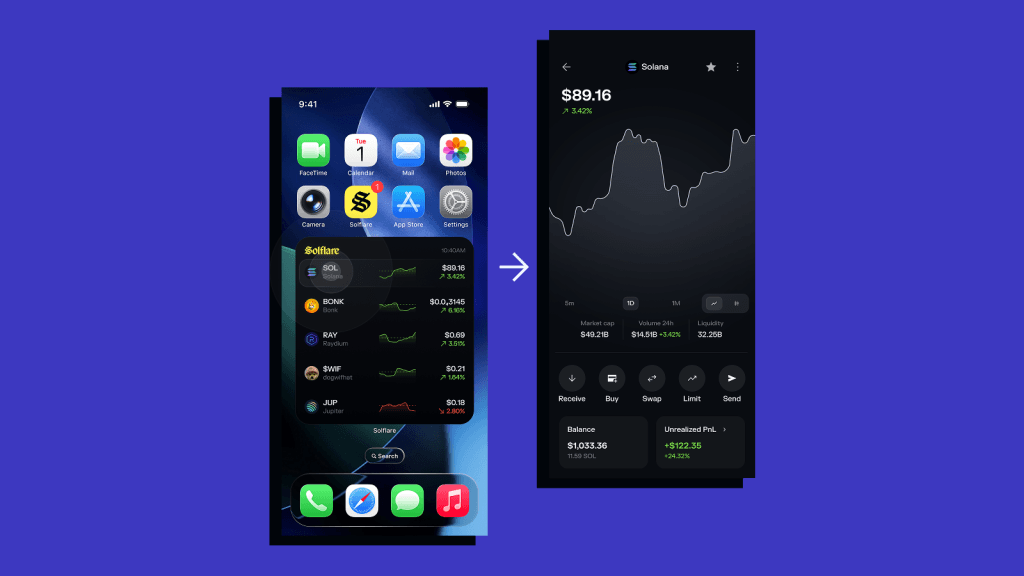
The Price Tracker shows:
- current price
- 24h price change
- a simple chart showing the price movement
You can choose your assets and widget size (small, medium, or large), depending on how much detail you want.
Tap the widget, and you’re taken straight to the token page inside Solflare.
Wallet at a glance
See your portfolio without opening the app.

The Wallet at a glance widget shows:
- your current wallet balance
- 24h performance
It also gives you direct access to key actions like swap, send, deposit and stake.
One tap takes you exactly where you want to go. No extra steps.
Top gainers & losers
Stay in sync with what’s moving.
The Top gainers & losers widget highlights the biggest market moves over the last 24 hours — helping you spot trends and opportunities quickly.
Available in multiple sizes, it gives you a fast snapshot of market momentum.
Tap it, and you’ll land directly on the Market page with the relevant filter applied.
Stay on top and act on it
Solflare Widgets are designed to connect those two moments:
- See what’s happening
- Act on it instantly
Instead of switching between apps or navigating through menus, you go from glance to action in one tap.
No need to rely on separate apps, open your wallet every time you want to check your balance or search for the right screen.
Everything is right there, on your home screen, updating regularly and ready when you are.