Tracking the Next Big Solana Meme Coin (with Solflare Tools)
7 min readSolflare isn’t just a wallet. Whether you’re tracking trends, watching volume spikes, or exploring new meme coins, Solflare gives you the tools to stay informed and act with confidence — all in one place.
In the world of meme coins, timing is everything.
Spotting a new token before it trends on Twitter or explodes on a DEX can mean the difference between a 2x and a 100x. But on Solana — where coins launch by the day and communities form “over night” — tracking the next breakout meme coin takes more than luck.
It takes the right mindset, real-time data, and tools that put you in control. With portfolio tracking, token visibility, and easy dApp access, Solflare helps you stay one step ahead of the next viral wave.
In this guide, you’ll learn:
- How to find new Solana meme coins early
- How to track performance and volume
- How to separate the next big thing from the next big rug
- How to use Solflare to organize, monitor, and manage your positions
Let’s get into it.
How to Find Meme Coins Early
Getting in early is the name of the game.
Here are the key ways traders discover new Solana meme coins before they trend:
1. Start with Social Signals
Most meme coins don’t have a roadmap — they have memes, tweets, and community hype.
To get ahead:
- Follow meme coin aggregators like @birdeye_so, @solanafloor, and active Solana influencers
- Set alerts for meme coin mentions on X (Twitter)
- Watch hashtags like #solanamemecoins, #bonkseason, or project-specific tags
Solflare doesn’t replace Twitter — but once you find a new token, you can drop it into your wallet to start tracking it before you even buy.
2. Track On-Chain Activity
If a token or the hype around it catches your eye, always check what’s behind it. Various tools can help you explore the market further. Go to the Explore tab in the Solflare app to connect to tools like:
- Birdeye to track volume spikes, top gainers, and new token launches
- DEXScreener to view token price charts, liquidity flow, and trading history
- DexTools to check what’s being swapped the most across the ecosystem
Track indicators around a token, like daily volume, number of holders, and the verified token contract.
3. Use Solflare’s Market Feature to Discover and Validate Tokens
The built-in Market feature gives you a live overview of the Solana ecosystem. Inside Market you’ll see the top 100 tokens on Solana ranked by:
- Market cap
- Trading volume
- Liquidity
- Daily gainers and losers
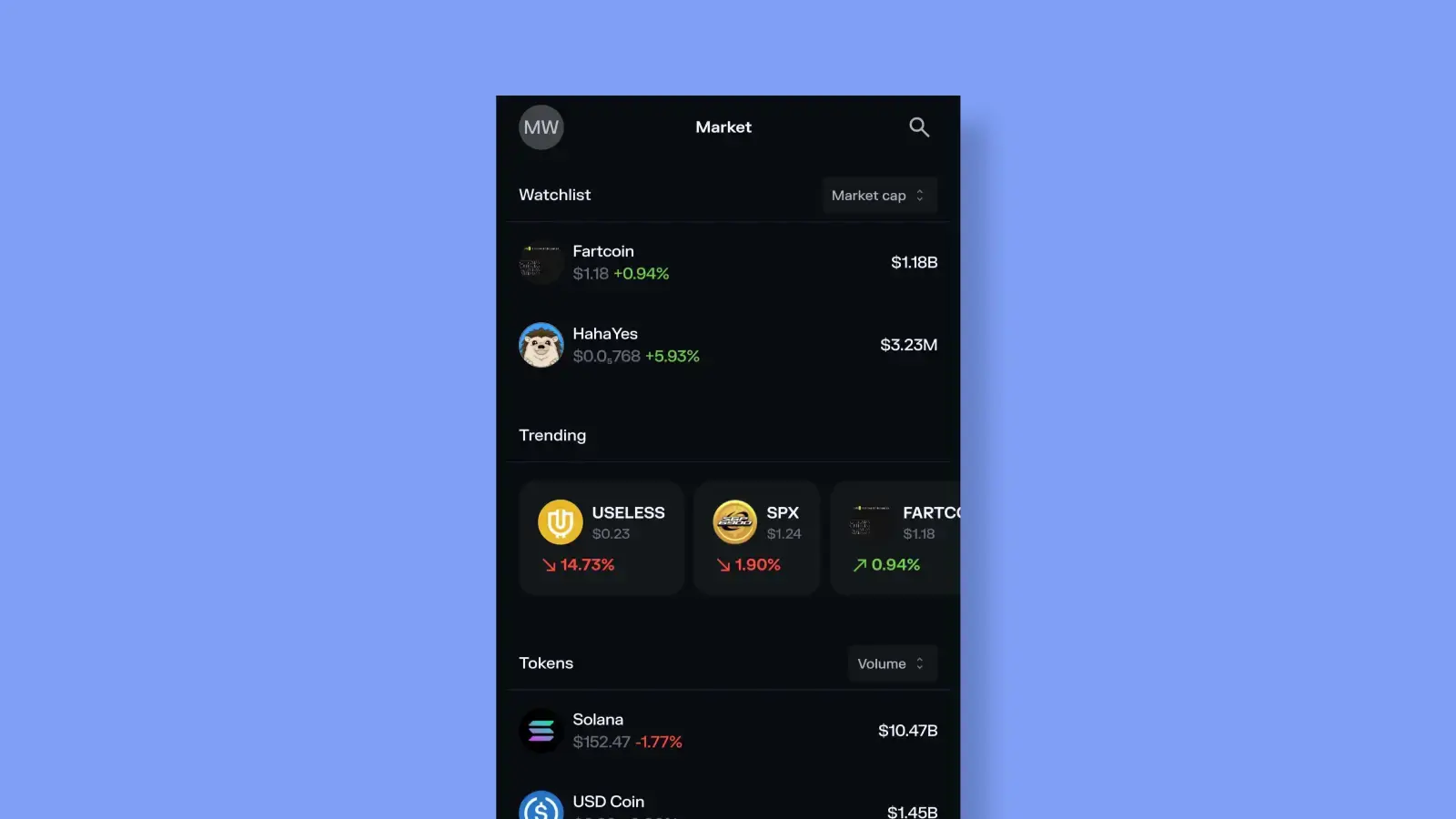
Above the top 100 there’s the “Trending” section where you can explore memecoins that are currently trending and their price trend in the last 24 hours.
Tap into any token to view:
- Live price and historical graph
- Market cap, volume, liquidity, and holders
- Official links like website, socials, and verified contract address
- Direct buy, swap, send, or set limit order — all in one screen
Spot something pumping? You can take action without ever leaving the app.
Don’t see the coin you’re looking for? Search for it by name, ticker, or enter the token address into the search bar.
You can also add any coin you like to your watchlist and see them all listed at the top of the “Market” section.
Whether you’re tracking a top 100 coin or vetting a low-cap gem, Solflare’s Market tab gives you the real data you need — fast.
4. Add Custom Tokens and Track Performance
For new or experimental tokens not yet listed in Market:
- Paste the contract address into Solflare
- Track its balance, value, and performance live
- Monitor price movement even if you haven’t bought in yet
- Use a “watch-only” wallet for high-risk tracking before diving in
This helps you stay ready without committing capital until you’re sure.
Solflare isn’t just where you hold tokens — it’s where you discover, validate, and act on meme coin opportunities. And when time is the difference between a 10x and a rug pull, having all your tools in one place matters.
How Solflare Helps You Track Smarter
Here’s how Solflare becomes your meme coin radar:
- Custom Token Import
→ Instantly add new meme coins by pasting the contract address. No need to wait for token recognition — track from day one. - Real-Time Price Monitoring
→ Solflare pulls live pricing data for tracked tokens, so you can see value changes without switching tools. - Portfolio View
→ Organize your meme coins alongside core holdings, or create a separate wallet just for experimental buys. - Multi-Wallet Switching
→ Run different wallets for different strategies (i.e. long-term bag vs. degen trades) and toggle between them instantly. - Built-in Swap + Explore Tabs
→ Seamlessly transition from discovery to execution by swapping directly in-app or jumping to a DEX via Explore when you’re ready to pounce.
Solflare turns your wallet into a full-featured meme coin dashboard — built for clarity, speed, and control.
Need help buying meme coins? Check: How to Buy and Trade Solana Meme Coins Using Solflare
Evaluating Meme Coins on Solana
In meme coin territory, the difference between catching a rocket and getting rugged often comes down to what you notice early. Anyone can follow the hype. Smart traders look deeper.
Here’s how to assess whether a new Solana meme coin is worth your attention — or a hard pass.
Signs of a Legitimate Meme Coin
Look for tokens that show organic momentum and solid fundamentals, even if they’re wrapped in memes.
Healthy Liquidity
If there’s not enough liquidity, you won’t be able to exit when it counts.
- Aim for tokens with at least $100K+ in liquidity if you’re putting in serious money
- Use Birdeye or DexScreener to check liquidity and lock status
Real Volume & Holder Growth
A good meme coin gains traction quickly — and shows signs of a growing community.
- Look for rising daily volume and holder count
- Use Solflare Market or Birdeye to track
Community Presence
A meme coin lives or dies by its community.
- Check if they have an active Twitter/X, meme content, Telegram/Discord
- Bonus points for humor, originality, and dev transparency
Verified Info & Contract Safety
- Does the token have a working website and social links?
- Is the token contract verified?
- Solflare’s Market view includes official token addresses, social links, and explorer data
Signs to Stay Away
If a token looks too good to be true — it probably is. Avoid projects that show these warning signs:
Suspicious Tokenomics
- Huge percentage of supply held by one wallet or the dev team
- No information on supply cap, burns, or vesting
- Minting rights still active
Fake Copies and Lookalikes
- Tokens mimicking $WIF, $BONK, or other popular coins with slight name changes
- Always verify contract addresses — Solflare lets you check them before you swap
Dead Socials / Fake Engagement
- Twitter account with zero followers, or obviously botted engagement
- Discord full of spam and no mods
- No presence = no community = no staying power
No Liquidity Lock or Obvious Dev Dumps
- Use Birdeye or DEXScreener to check if liquidity is locked
- Sudden 50% sell-offs from dev wallets = major red flag
Remember: A meme coin doesn’t need a whitepaper — but it does need real traction. Use the tools inside Solflare to verify token data, monitor price action, and make smart decisions.
Final Thoughts
In the Solana meme coin jungle, staying early and staying sharp is everything.
The next $BONK or $WIF could drop at any moment — but if you’re stuck fumbling with browser tabs, scattered tools, or unverified info, you’re already behind. Timing matters. Visibility matters. Simplicity matters. That’s why Solflare gives you more than just a wallet:
- A built-in Market tab for spotting trending tokens
- Seamless portfolio tracking and custom token support
- Direct access to top dApps, launchpads, and tools
- Real-time insights so you can act fast and manage risk
Explore meme coins with Solflare
Find the meme coins you want. Take control of your bag.