A private key in crypto is a unique cryptographic code that proves you own a crypto wallet and authorizes transactions you make on the blockchain.
Key Takeaways
- A private key is a randomly generated cryptographic code that proves ownership of a crypto wallet and authorizes every transaction — whoever has it controls the wallet, permanently and without recourse
- You never need to see or handle your private key directly — your wallet manages it in the background, using it to sign transactions every time you confirm an action
- Your private key and your seed phrase are not the same thing — the seed phrase is the master input that generates all your private keys, which is why losing it means losing access to everything
- Private keys are most commonly compromised through phishing, malware, and digital storage — not through sophisticated hacking, which means most exposures are preventable
- The strongest protection available is a hardware wallet, which keeps your private key in an offline secure element that never exposes it — even to the device it’s connected to
This guide covers what a private key is, how it works, how it relates to your public key and seed phrase, and what to do to keep it safe.
What Is a Private Key in Crypto?
A private key is a unique, randomly generated string of characters that proves ownership of a crypto wallet and authorizes transactions on the blockchain.
In technical terms, it’s a 256-bit number, usually displayed as a 64-character string of letters and numbers that looks something like this: 5KJvsngHeMpm884wtkJNzQGaCErckhHJBGFsvd3VyK5qMZXj3hS.
It’s generated automatically the moment you create a wallet. You didn’t choose it, you can’t change it, and in normal use you’ll never actually need to see it. Your wallet software manages it in the background, using it to sign transactions on your behalf every time you confirm an action like sending crypto.
That last point is worth dwelling on. You don’t need to know or handle your private key directly. The wallet does that for you. What you do need to understand is what the private key represents and how to keep it safe.
Whoever has your private key can control your wallet. The private key is the proof of ownership, and the blockchain only recognizes proof of ownership.
How Does a Private Key Work?
The key pair
When you create a wallet, two linked keys are generated simultaneously: a private key that only you hold, and a public key derived from it mathematically.
The public key has two jobs. First, it generates your wallet address — that long string of characters you share with others to receive crypto.
Second, it’s used by the blockchain to verify that transactions coming from your address were actually authorized by you. When you sign a transaction with your private key, the network checks that signature against your public key to confirm it’s legit, without ever seeing the private key itself.
The relationship between the two keys is one-way. You can always derive the public key from the private key, but it’s computationally impossible to reverse the process. That one-way property is what makes the whole system secure.
A simple way to think about it: the public key is like a padlock you hand to anyone who wants to send you something. The private key is the only thing that opens it.
Signing transactions
When you send crypto or interact with a dApp, your wallet uses the private key to create a digital signature for that specific transaction. Think of it as a unique cryptographic stamp that says: the owner of this address has authorized this action.
The blockchain network then verifies that signature using your public key — confirming it was authorized by whoever holds the private key — without ever seeing the private key itself. The network can verify your authorization without you ever exposing your secret.
This is also why private keys never need to leave your device. The signing happens locally, in your wallet. The network only ever sees the signature and the public key — both of which are safe to share.
Private Key vs. Public Key: What’s the Difference?
The private key and public key are two halves of the same system, but they serve completely opposite purposes. One is meant to stay secret forever. The other is designed to be shared freely.
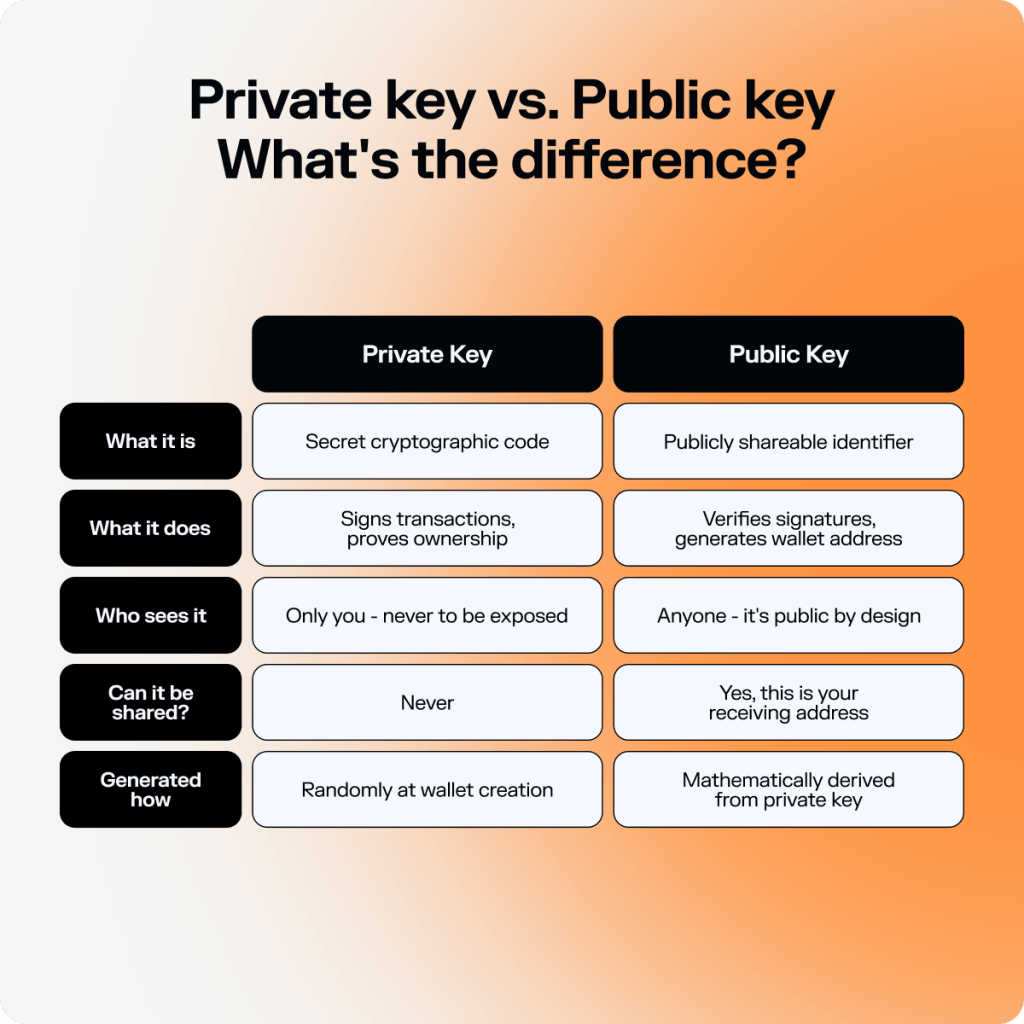
The key thing to understand is the direction of the relationship. The private key generates the public key. The public key generates your wallet address. That chain only runs one way.
Your wallet address is essentially a compressed, formatted version of your public key. When someone sends you SOL, they’re sending it to that address. When you want to spend it, your wallet proves ownership by signing with the private key that sits at the other end of that chain.
Seed Phrase vs Private Key: What’s the Difference?
The private key and seed phrase are closely related but not the same.
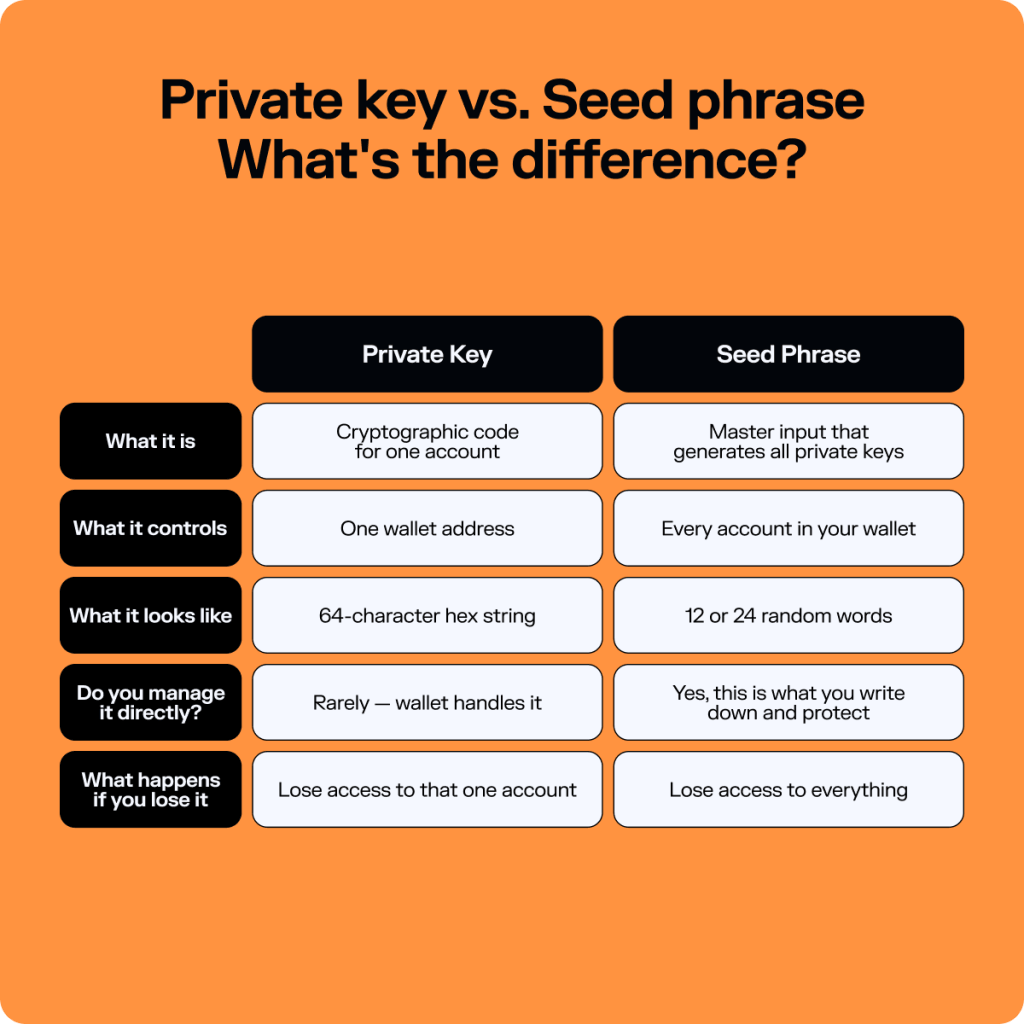
Every wallet address has its own private key. That private key is what controls that specific address. One private key, one wallet address.
When you create a modern software wallet app, a seed phrase is generated — 12 or 24 random words that act as the master key for your entire wallet. From that single seed phrase, your wallet can generate multiple private keys, each controlling its own address.
If you add a second wallet in the app, a new private key is derived from the same seed phrase. Add a third, same thing. The seed phrase is the root that everything else grows from.
This is why the seed phrase is what you back up, and not a list of private keys. It’s designed to be written down and stored safely by a real person: 12 or 24 words rather than a 64-character string of random characters.
If you lose the private key for one account and you lose access to that account (even though the private key is automatically managed by your wallet app, so losing it is technically “impossible”).
Lose your seed phrase and you lose access to everything — every account, every private key, every asset across your entire wallet with no other way to access them.
Learn how to keep your wallet safe: Securing Your Crypto Wallet: Best Practices
In practice, you'll almost never directly interact with your private keys. Your seed phrase is what you manage. Your wallet handles everything else.
One thing worth knowing: some wallets, particularly older ones, or standalone imported accounts, give you a single private key rather than a seed phrase. In that case, that private key is all you have. There’s no seed phrase sitting above it in the hierarchy. Solflare supports importing both, so whether you have a seed phrase or a standalone private key, you can bring it in.
| Private Key | Seed Phrase | |
| What it is | Cryptographic code for one account | Master input that generates all private keys |
| What it controls | One wallet address | Every account in your wallet |
| What it looks like | 64-character hex string | 12 or 24 random words |
| Do you manage it directly? | Rarely — wallet handles it | Yes, this is what you write down and protect |
| What happens if you lose it | Lose access to that one account | Lose access to everything |
What Happens If Someone Gets Your Private Key?
The short answer: they have full, immediate, and permanent control of that wallet.
There’s no grace period, no freeze option, no support ticket that fixes it. The blockchain doesn’t know the difference between you signing a transaction and an attacker signing one with the same key. A valid signature is a valid signature — and whoever produces it controls the funds.
In practice, that means: if someone gets your private key, they can drain your wallet in seconds, transfer everything to an address you have no access to, and there is nothing you or anyone else can do about it. No exchange can reverse it. No wallet provider can freeze it. Solflare has no access to your private keys and no ability to intervene, which is exactly the point of self-custody, but also exactly why exposure is so serious.
Exposed private keys and seed phrases accounted for a significant share of the roughly $2.2 billion lost to crypto hacks and exploits in 2024, according to Chainalysis — with private key compromises representing the single largest attack vector by value stolen.
How private keys get exposed
Most private key compromises don’t happen through sophisticated hacking. They happen through:
Phishing. Fake wallet apps, fake support agents, and fake dApp websites that ask you to enter or paste your private key or seed phrase. No legitimate service ever needs this.
Malware. Software on your device that monitors clipboard activity or scans for wallet files. If you copy a private key and paste it somewhere, malware can capture it in the moment it’s on your clipboard.
Digital storage. Screenshots, notes apps, cloud storage, email drafts — anywhere a private key is stored digitally is a potential attack surface. A cloud storage breach, a compromised email account, or a hacked device can expose it instantly.
Fake support. Someone posing as a wallet support agent (over Discord, Telegram, Twitter, or email) who asks for your private key or seed phrase to “help” with an issue. Legitimate support agents never ask for this. If someone does, it’s a scam.
What to do if you think your private key is compromised
Act immediately. If you have reason to believe your private key has been exposed, the only effective response is to move your funds to a new wallet as fast as possible — before the attacker does. Create a new wallet with a fresh seed phrase, transfer everything you can, and treat the compromised wallet as permanently unsafe from that point forward.
How to Keep Your Private Key Safe
The good news: for most users, keeping your private key safe doesn’t require doing anything complicated. It mostly requires not doing a few specific things — and understanding why.
Protect your seed phrase first
Since your seed phrase generates all your private keys, protecting your seed phrase is protecting your private keys. The two are inseparable.
Write your seed phrase down on paper. Store it somewhere physically secure — a safe, a locked drawer, somewhere only you can access. Don’t store it digitally in any form: no screenshots, no notes apps, no cloud storage, no email drafts. A digital copy of your seed phrase is a private key exposure waiting to happen.
Never export your private key unless absolutely necessary
Your wallet manages your private keys invisibly — and that’s the safest state for them to be in. The moment you export a private key, you create a copy of it that exists outside the wallet’s secure environment. That copy needs to be managed carefully from that point forward.
The two situations where exporting is legitimate: migrating a standalone wallet account to a new wallet app, or importing an account that predates the seed phrase standard. Outside of those cases, there’s rarely a good reason to export a private key. If something is prompting you to do so unexpectedly, treat it with suspicion.
If you do export a private key, treat it exactly like a seed phrase. Write it down, store it offline, and delete any digital copies immediately after use.
Never share your private key with anyone
No legitimate wallet, dApp, support agent, or protocol will ever ask for your private key. Ever. Not in a support ticket, not in a verification step, not to “unlock” your account, not for any reason.
If something asks for your private key, it is a scam. Close the window, don’t engage, and if it was a website — check whether your wallet was connected to it and revoke any permissions.
Download wallets only from official sources
Fake wallet apps that look identical to the real thing are one of the most effective private key theft mechanisms in existence. They function normally right up until you import a seed phrase or private key — at which point they send it to an attacker.
Always download Solflare from solflare.com, the Apple App Store, or the Google Play Store. Verify the developer name when installing browser extensions.
Use a hardware wallet for significant holdings
A hardware wallet stores your private key in a dedicated secure element — a chip designed specifically to hold cryptographic material and never expose it, even to the device it’s connected to. When you sign a transaction with a hardware wallet, the private key never leaves the device. The signing happens inside the secure element, and only the signature is transmitted.
This is the strongest protection available for private keys. Even if your computer is fully compromised by malware, an attacker can’t extract the private key from a hardware wallet without physical access to the device.
Solflare Shield integrates directly into the Solflare app — tap-to-sign NFC, no cables, no separate interface. For anyone holding meaningful amounts of SOL long-term, it’s the most effective private key protection available.
Do You Ever Need to Use Your Private Key Directly?
For most people, in most situations: no.
In modern apps, your private keys are managed entirely by the wallet. You approve transactions, the wallet handles the signing. You back up your seed phrase, the wallet derives the private keys. The whole system is designed so you never need to think about private keys directly.
That said, there are two situations where you’d interact with a private key directly:
Importing a standalone account. If you have a wallet account that was created without a seed phrase (common in older wallets or some exchange withdrawal flows), you’ll have a raw private key rather than a seed phrase.
To bring that account into Solflare, you import the private key directly. Solflare supports this in the wallet settings under “Add Account.” See How to Import a Wallet into Solflare for more.
Migrating from an older wallet. Some early wallet formats predate the BIP-39 seed phrase standard. If you’re moving funds from an older wallet that only gives you a private key, importing it into Solflare is the cleanest path. After importing, you can transfer everything to a new account with a proper seed phrase backup — which is the recommended long-term setup.
Outside of these two cases, if something is prompting you to export or enter a private key, pause and question why. It’s almost never necessary, and unexpected requests for private keys are a strong signal that something is wrong.
Where to Go From Here
Private keys are the foundation of everything in crypto. They’re what makes true ownership possible — no central authority required, no permission needed, no one who can take it from you. But they’re also what makes personal responsibility non-negotiable. There’s no reset.
FAQs
Yes — but only for that specific account. A private key recovers one wallet address. For full wallet recovery across all accounts, you need your seed phrase.
Not exactly. Your wallet address is a shortened, formatted version of your public key. On Solana, the two are effectively the same thing displayed in Base58 encoding. Either way, your address is safe to share — it contains nothing that could expose your private key.
A 64-character string of letters and numbers — something like 5KJvsngHeMpm884wtkJNzQGaCErckhHJBGFsvd3VyK5qMZXj3hS. Most users will never see it in this form. It stays inside the wallet’s secure environment.
In practice, no. There are 2²⁵⁶ possible private key values — guessing one is computationally impossible. The real risk isn’t someone guessing your key. It’s accidentally exposing it through phishing, malware, or unsafe storage.
A password is something you choose and can change. A private key is mathematically generated and permanent — if it’s compromised, you can’t reset it, only abandon the wallet and move your funds. A password is verified by a server. A private key is verified by the entire blockchain through cryptographic proof.
Nothing — you’re fine. Your seed phrase regenerates all your private keys. Restore it in any compatible wallet and every account and balance is recovered exactly as it was.