A Web3 wallet is a non-custodial crypto wallet that gives you full ownership of your digital assets and connects you to the decentralized web. With one, you can access DeFi protocols, trade tokens, stake crypto, collect NFTs, and interact with dApps — all while keeping full self-custody.
Web3 is about ownership, and to be a part of it, you need a wallet. This guide covers what a Web3 wallet is, what you can actually do with one, how it works under the hood, and how to use one safely.
What Is a Web3 Wallet?
A Web3 wallet is a tool that gives you access to the decentralized web, letting you store and manage digital assets, interact with decentralized applications, and participate in blockchain-based ecosystems without relying on a centralized platform.
Unlike opening accounts stored on centralized platforms (which is a thing of Web2), a Web3 wallet is yours, controlled by your own private key that no company owns. You use it to hold assets, interact with apps, and establish ownership onchain, without asking anyone’s permission.
How is it different from a regular crypto wallet?
The distinction is more about emphasis than function.
A crypto wallet is the broader term. It refers to any tool that manages private keys and lets you interact with a blockchain. It covers everything from a basic wallet that sends and receives tokens to a full-featured app.
Web3 wallet emphasizes the connectivity layer — the ability to participate in the broader ecosystem of a blockchain. This includes interacting with decentralized applications, DeFi protocols, NFT marketplaces, decentralized exchanges, staking platforms, and more. All Web3 wallets are crypto wallets, but not all crypto wallets have the dApp connectivity and smart contract interaction that “Web3” implies.
What separates a Web3 wallet from a basic crypto wallet is what you can do with it. A basic wallet sends and receives tokens. A Web3 wallet is your interface to an entire ecosystem — DeFi, NFT marketplaces, decentralized exchanges, staking platforms, and more. It’s less like a piggy bank and more like an “ID” for the entire Web3 world.
In practice, if you have a non-custodial wallet like Solflare that connects to dApps and lets you interact with Solana’s ecosystem, you have both. They’re different labels for the same tool used in different contexts.
How does it differ from an exchange account?
When you hold crypto on a CEX, your funds are held in a custodial wallet, which is more like an account than an actual wallet. The exchange holds your private keys. You have a login, a balance display, and the exchange’s permission to access your funds. That’s custodial ownership, and it comes with real trade-offs: the platform can freeze your account, limit withdrawals, or fail entirely.
A Web3 wallet is non-custodial by default. Your private keys are generated on your device and stay there. No company holds them, controls them, or can take them away. The trade-off is responsibility: if you lose your seed phrase, nobody can help you recover access. But for anyone serious about using crypto, that trade-off is worth it.
Learn more: Ccustodial vs. non-custodial wallets
What Can You Do With a Web3 Wallet?
In short: anything that happens onchain. The longer answer is worth going through because the range is wider than most people expect when they first get started.
Hold and manage your digital assets
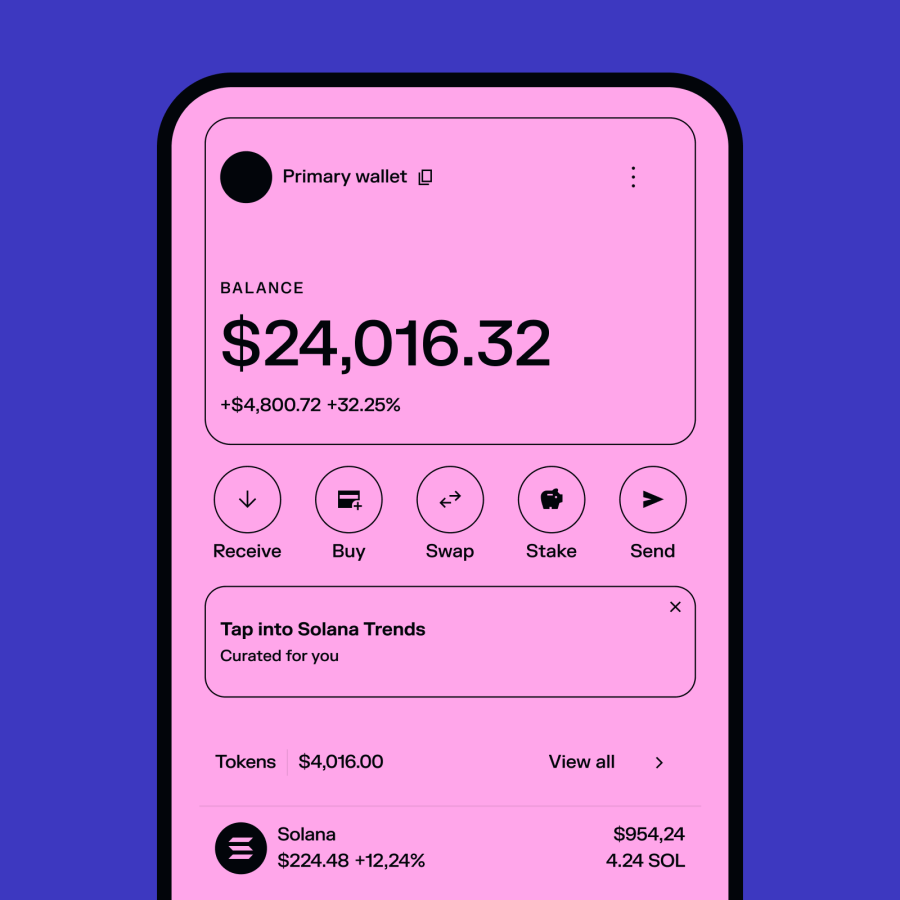
The starting point for any Web3 wallet. Everything you own onchain is visible and manageable from your wallet. Your balance updates in real time, and because the wallet is non-custodial, what you see is genuinely yours. No platform holds it on your behalf and you don’t need permission to access it.

Access DeFi protocols
DeFi services like lending, borrowing, yield strategies, and liquidity provision are only accessible through a Web3 wallet. You connect your wallet, approve a transaction, and you’re in.

Trade tokens without an exchange
With a Web3 wallet, you can swap tokens directly through an integrated decentralized exchange (DEX). Most wallets have a built-in DEX aggregator that finds the best rate across liquidity pools automatically, so you don’t even need to leave the wallet to do it.

Stake crypto and earn rewards
Staking is one of the most practical things you can do with a Web3 wallet. You can choose a validator and stake the crypto you are already holding and earn anywhere from 4% to 8% APY (depending on the blockchain, validator, etc.). No middleman takes a cut while your crypto stays in your custody.
Learn more: 6 Best Platforms for Staking Solana in 2026

Collect and manage NFTs
NFTs live onchain, which means a Web3 wallet is where you hold them, transfer them, and interact with NFT marketplaces. A good web3 wallet displays your full NFT collection natively, flags suspicious or unverified tokens, and lets you send NFTs directly from the app.

Your wallet as an identity
Beyond transactions, your Web3 wallet address functions as your identity onchain. It’s what connects you to every protocol, every dApp, every transaction in your history. Some platforms use wallet-based login as a replacement for traditional username/password accounts. Your wallet signature proves who you are without revealing anything else.
How Does a Web3 Wallet Work?
You don’t need to understand the technical details to use a Web3 wallet. But knowing the basics makes you a more confident and more secure user.
One thing worth knowing upfront: you can't do anything wrong just by creating a wallet or viewing your balance. Funds only move when you explicitly confirm a transaction. The wallet is safe to explore.
Keys and addresses
Every Web3 wallet is built around two things: a private key and a public key.
Your public key generates your wallet address. It is that long string of characters you share to receive crypto. Anyone can send to it and sharing it is completely safe.
Your private key is the cryptographic secret that proves you own what’s at that address and authorizes every transaction you make. It never leaves your device. Anyone who has it has full control of your wallet which is why protecting it is the most important thing you do as a crypto user. Learn more about private keys.
Your seed phrase
When you create a wallet, you’re given a seed phrase — 12 or 24 random words that are the human-readable version of your private key. It’s also called a recovery phrase because it’s the only way to restore your wallet if you lose access to your device.
Write it down on paper and store it somewhere physically secure. Losing your seed phrase means losing access to your wallet permanently — there’s no reset, no support ticket that fixes it. It is the master key to everything.
How transactions work
When you send crypto or interact with a dApp, you’re signing a transaction with your private key — a cryptographic proof that you, the owner of that address, have authorized this specific action. The wallet handles this in the background, so you never touch the private key manually. But that’s what’s happening every time you hit confirm.
Nothing moves without your explicit approval.
Types of Web3 Wallets
Web3 wallets come in two main forms: software wallets and hardware wallets. The difference comes down to where your private key is stored — and how much protection that gives you.
Software wallets
A software wallet (also called a hot wallet) is an app — either a browser extension or a mobile app — that stores your private keys on your device. It’s the most common starting point for Web3 users.
As a browser extension, the wallet installs into your browser and connects to dApps automatically when you visit them. As a mobile app, it gives you the same functionality on the go — checking balances, sending funds, staking, swapping, and interacting with dApps through an in-app browser.
Solflare is available as both. The Chrome extension and the iOS/Android app give you identical functionality — same wallet, same address, accessible wherever you are.
Software wallets are non-custodial by design: your private keys are stored on your device and never shared with anyone. That’s what makes them genuine Web3 wallets, as opposed to exchange accounts where a company holds the keys on your behalf.
Explore Web3 with full self-custody
Buy and trade crypto, explore the ecosystem, and own your assets with Solflare. Full self-custody. Available as a mobile app and browser extension.
Hardware wallets
A hardware wallet (also called a cold wallet) is a physical device that stores your private keys completely offline. Transactions are signed on the device itself — which means even if your computer or phone is compromised, an attacker can’t access your keys without physically having the device.
The trade-off is convenience. Hardware wallets add a confirmation step to every transaction. For everyday activity, that’s minor friction. For long-term storage of significant holdings, it’s a worthwhile layer of security.
Solflare Shield is a tap-to-sign NFC hardware wallet that integrates directly into the Solflare app. There are no cables, no separate interface to learn — just tap to approve transactions, with your private keys staying offline the whole time.
How to Connect a Web3 Wallet to a dApp
Connecting your wallet to a dApp is one of the first practical things you’ll do as a Web3 user. Here’s how it works and what to keep in mind.
The connection flow
Almost every dApp has a “Connect Wallet” button, usually in the top right corner. Click it, select your wallet from the menu, and approve the connection request in your wallet.
That approval only shares your public address with the dApp, nothing else. No funds move, no permissions are granted yet. The dApp simply knows who you are and what you hold.
On desktop, the browser extension is detected automatically. On mobile, open the dApp through the wallet’s in-app browser or use WalletConnect if the dApp supports it.
Approving transactions
Once connected, any action that requires moving funds, like a swap, a stake, or a transfer, sends a transaction request to your wallet for you to approve or reject. Nothing happens without your confirmation.
Take a few seconds to read what you’re signing before confirming. Some approvals are simple (“send 1 SOL to this address”). Others grant a protocol ongoing permission to spend tokens on your behalf. Some wallets (like Solflare) simulate transactions before you sign them, showing you exactly what will happen, so you’re never approving blind.
Revoke permissions when you’re done
dApp connections can leave active approvals on your wallet that persist indefinitely. Periodically check which dApps have permissions and revoke anything you no longer use or recognize. On Solana, tools like Revoke.cash make this straightforward in a few clicks.
Web3 Wallet Security
Self-custody means you’re responsible for your own security. That’s not a reason to be intimidated — most wallet compromises come down to a small number of avoidable mistakes. Get the basics right and you’re significantly better protected than most users.
Protect your seed phrase above everything else
Your seed phrase is the master key to your wallet. Anyone who has it has full, permanent access to your funds — no password, no verification, no delay.
Write it down on paper. Store it somewhere physically secure. Never type it into any website or app. Never share it with anyone, including people claiming to be support agents. Never store it digitally — no screenshots, no notes app, no cloud storage, no email drafts.
Data tracked by CoinLaw and SQ Magazine confirms that among the 24% to 30% of crypto users who have lost access to their funds at least once, seed phrase or private key loss is cited as the primary cause— making it one of the most common causes of permanent wallet loss. If something is asking for your seed phrase, it’s a scam. No legitimate wallet, protocol, or support team will ever ask for it.
Learn more: How to Secure Your Crypto Wallet
Read what you’re signing
Every transaction approval is a signature. Some signatures are simple — send this amount to this address. Others are more complex — grant this protocol permission to spend tokens on your behalf, or authorize a contract interaction with specific parameters.
Taking five seconds to read what a transaction is actually doing before confirming it is one of the highest-value habits you can build.
Only download from official sources
Fake wallet apps designed to steal your private keys exist across app stores and search results. They look legitimate, function normally, and drain your funds the moment you import a seed phrase.
Always download Web3 wallets from official sources: official websites, the App Store, or the Google Play Store. When installing the browser extension, verify you’re installing from the Chrome Web Store and check the developer name.
Watch out for fake dApps
The connect button is one of the most common entry points for phishing attacks. Fake websites that mimic real dApps look almost identical to the real thing, ask you to connect your wallet, and then request a transaction that drains your funds.
Before connecting to any dApp, verify the URL. Bookmark official sites rather than navigating from search results or links in DMs. If a transaction request looks unexpected, unfamiliar, or asks for permissions that seem broader than what the app should need, reject it.
Revoke unused approvals
Token approvals you granted to dApps in the past can remain active indefinitely. An approval you granted to a protocol six months ago is still valid — and if that protocol is later exploited, an attacker could use that approval to access your funds.
Audit your active approvals periodically and revoke anything you don’t recognize or no longer use. Tools like Revoke.cash make this straightforward on Solana.
Consider a hardware wallet for larger holdings
A hardware wallet keeps your private keys offline, adding a layer of protection that software alone can’t match. Even if your computer or phone is fully compromised, an attacker can’t sign transactions without physical access to the device.
Solflare Shield integrates directly into the Solflare app — tap-to-sign NFC, no cables, no separate interface to learn. For anyone holding a meaningful amount of SOL or other assets long-term, it’s a worthwhile upgrade. Learn about Solflare Shield.
Choosing a Web3 Wallet (What to Look for)
With dozens of wallet options available, the choice can feel overwhelming. In practice, a few criteria narrow it down quickly.
- Non-custodial is the default: This is the starting point. A wallet that holds your private keys on your behalf isn’t really a Web3 wallet — it’s a managed account. Look for a wallet where your keys are generated on your device and never leave it. Self-custody is the whole point.
- Built for the chain you’re using: Multi-chain wallets that support dozens of networks tend to do each one adequately rather than exceptionally. For example, if you’re primarily on Solana, a Solana-native wallet will give you better token support, more reliable dApp connectivity, and a more complete feature set than one that added Solana as an afterthought.
- Security features beyond the basics: Transaction simulation, token flagging, and suspicious transaction warnings aren’t premium features — they’re things a well-built wallet should include by default. A wallet that passes transactions through without surfacing what you’re actually signing puts the burden entirely on you. Hardware wallet support is worth factoring in too, especially if you’re planning to hold meaningful amounts long-term.
- Features that reduce friction: The more you can do from a single interface — staking, swapping, NFT management, dApp access — the less you’re bouncing between apps and creating opportunities for error. Consolidation is a security benefit as much as a convenience one.
- Support when you need it: Self-custody means you’re responsible for your own security — but that doesn’t mean you should be entirely on your own. A wallet with responsive, knowledgeable support is worth more than most people realize until something goes wrong.
For Solana, Solflare covers all of these. It's non-custodial, built exclusively for Solana, connects to the full dApp ecosystem, simulates transactions before you sign them, supports hardware wallet security via Solflare Shield, and offers 24/7 live human support. Everything covered in this article — staking, swapping, NFTs, DeFi, tokenized assets — is accessible from a single app.
FAQs
The terms are largely interchangeable. “Crypto wallet” is the broader term. “Web3 wallet” specifically emphasizes dApp connectivity and onchain interaction. In practice, a non-custodial wallet like Solflare is both.
No — you can buy crypto on a centralized exchange without one. But if you want to actually own use that crypto onchain, like staking, DeFi, dApps — you need a Web3 wallet.
The terms are largely interchangeable. “Crypto wallet” is the broader term. “Web3 wallet” specifically emphasizes dApp connectivity and onchain interaction. In practice, a non-custodial wallet like Solflare is both.
Another name for a Web3 wallet, with the emphasis on decentralized finance. If a wallet lets you connect to DeFi protocols and sign transactions, it’s a DeFi wallet. The terms are used interchangeably.
Yes, if used correctly. The technology is secure — most losses come from human error: seed phrases stored unsafely, phishing links clicked, or transactions approved without reading them. Build the right habits and a Web3 wallet is one of the safest ways to hold crypto.
Restore it using your seed phrase on any compatible wallet app. Your wallet, balance, and history come back exactly as they were. If you lose both your device and your seed phrase, access is permanently gone — which is why backing up your seed phrase correctly from the start is so important.
Your wallet address isn’t linked to your real-world identity by default. Anyone can see the transactions associated with it on the blockchain, but won’t know who owns it unless you’ve connected it to your identity somewhere — through a KYC exchange or by sharing it publicly.