A Solana wallet is your gateway to the entire Solana ecosystem. It enables you to buy, send, and receive crypto, use dApps, stake tokens, and manage everything you do on the blockchain.
If you’re getting into crypto, one of the first things you’ll come across is the idea of a “wallet.”
A crypto wallet sounds simple – like a digital wallet that holds your cryptocurrencies.
But that’s not quite how it works. A Solana wallet is much more than a tool to hold your SOL. In this guide, we’ll break down what a Solana wallet is, how it works, which one is right for you, and how to set it up safely, step by step.
What Is a Solana Wallet?
A Solana wallet is a tool that lets you access and interact with the Solana blockchain.
Despite the name, it doesn’t actually “store” your crypto.
Your SOL and tokens always live on the blockchain. The wallet simply gives you the ability to access, send, and use them. It does this by managing your private keys (credentials that prove you own your assets).
That’s the key idea to understand: A wallet is not storage, it’s access.
What does a Solana wallet actually do?
A Solana wallet is your interface to everything on the network.
With a wallet, you can:
- buy, send and receive SOL and other tokens
- stake your SOL to earn rewards
- swap tokens directly
- connect to decentralized apps (dApps)
- manage NFTs and other digital assets
Every action you take on Solana, whether it’s sending funds or using an app, goes through your wallet.
Want to try it yourself?
Set up a Solana wallet and explore these features firsthand.
How is it different from a traditional wallet?
A traditional wallet holds your money. A crypto wallet gives you control over your money.
With a crypto wallet, there’s no bank account, no login, and no company managing your funds in the background. Your wallet is what connects you directly to the blockchain.
This is why wallets are such a huge part of crypto.
Why “Solana wallet” specifically?
A Solana wallet is designed specifically for the Solana network. That means it’s optimized for:
- fast transactions
- low fees
- seamless interaction with Solana apps
- native support for SOL and Solana-based tokens
Not all wallets are built for the same blockchain. While some wallets support multiple blockchains, Solana-native wallets tend to offer a smoother experience within the ecosystem.
How Does a Solana Wallet Work?
You don’t need to know the technical details to use a crypto wallet. That said, having a basic understanding of how it works will help you get a better idea of what it is that you’re using.
It starts with your keys
Every Solana wallet (and every crypto wallet for that matter) is built around two things:
- a public key
- a private key
Your public key is your wallet address. It’s that long string of characters you share with others to receive crypto. You can think of it like an email address. Anyone can have it, anyone can send to it, and sharing it carries no risk.
Your private key is the other half. It’s a cryptographic secret that proves you’re the owner of that address (where the assets lie) and authorizes every transaction.
This one you never share. Not with a support agent, not with a website, not with anyone. Your private key is what gives you control.
If you’ve ever heard the phrase “Not your keys, not your crypto”, this is what it refers to.
What happens when you send crypto
Here’s an example. Say you’re sending SOL to a friend.
You open your wallet, enter your friend’s address, and hit send.

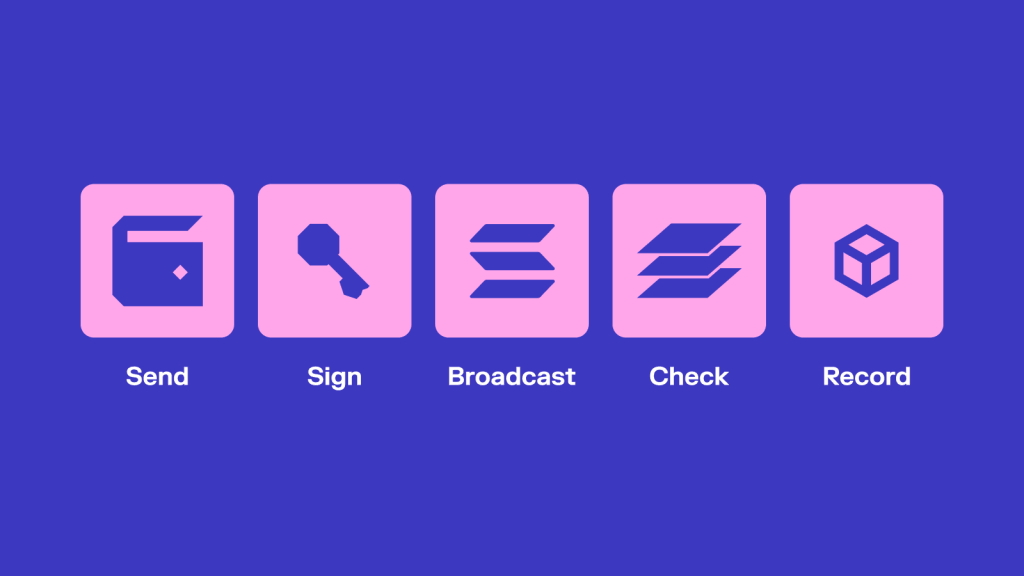
Behind the scenes, your wallet creates a transaction — a request to move funds from your address to theirs. That transaction is then signed locally on your device using your private key. You never manually touch a private key. The wallet handles the signing automatically.
This signature acts like a digital approval. It proves that you’re the owner of the funds and that you’ve authorized the transfer.
Once signed, the transaction is sent to the Solana network.
Validators check that everything is valid — your balance, your signature, and the transaction itself. If it passes, it gets confirmed and recorded on the blockchain.
In most cases, this takes a second or two.
From your perspective, it just feels like pressing “send”, but that’s what’s happening underneath.
Your wallet is the interface
Your crypto doesn’t move “into” or “out of” your wallet. All of this happens on the blockchain, but your wallet is what makes it usable.
It shows your balance, lets you send and receive tokens, and connects you to apps built on Solana.
Without a wallet, you can still view the blockchain — but you can’t interact with it.
The wallet is what turns the system into something you can actually use.
4 Types of Solana Wallets
Not all wallets work the same way.
If you’ve looked into crypto before, you’ve probably seen terms like hot wallet, cold wallet, or non-custodial. At first, they can feel confusing, but the differences are actually quite straightforward.
Most (Solana) wallets fall into a few main categories. Based on their connectivity to the Internet, they can be hot or cold, while based on ownership, they can be custodial or non–custodial. Let’s see what each of these is about.
Hot wallets vs. cold wallets
Hot wallets are the most common type, especially for beginners.
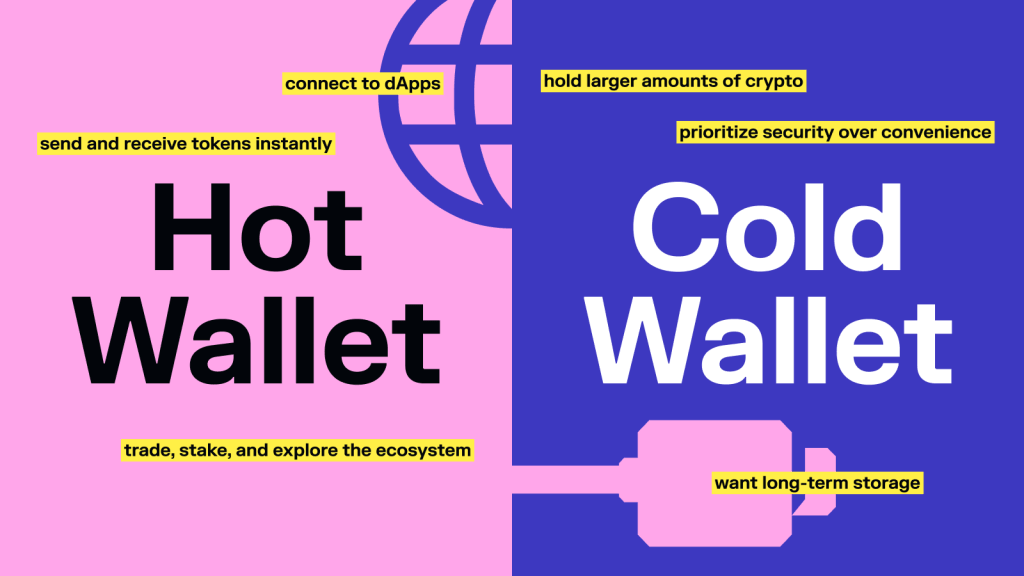
A hot wallet is a wallet that runs on your phone, browser, or computer, and is connected to the Internet. It comes in two forms: a mobile app or a browser extension.
They’re designed to be fast and convenient.
With a hot wallet, you can:
- send and receive tokens instantly
- connect to dApps
- trade, stake, and explore the ecosystem
Because they’re always online, they’re ideal for everyday use.
The trade-off is that they rely on the security of your device. As long as you follow basic security practices, they’re safe for most users, especially when you’re getting started.
Learn more: Hot Wallet vs. Cold Wallet: What’s the Difference?
Cold wallets (also known as hardware wallets) store your private keys offline.
Instead of being connected to the internet, they use a physical device to sign transactions. This adds an extra layer of protection because your keys are never exposed online.
They’re typically used by people who:
- hold larger amounts of crypto
- want long-term storage
- prioritize security over convenience
Cold wallets are very secure, but less convenient for everyday actions. Many users combine both: a hot wallet for daily use, and a cold wallet for long-term storage.
Solflare has its own hardware option – Solflare Shield. A tap-to-sign NFC device that cuts out the clunky cable flows of traditional hardware wallets while keeping your keys fully offline.
Custodial vs. non-custodial wallets
This is one of the most important distinctions.
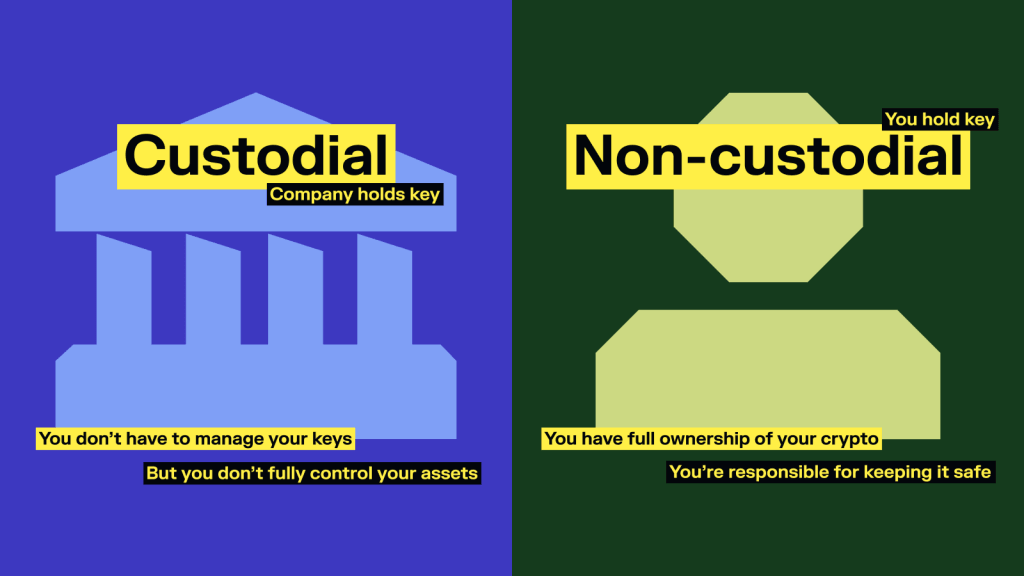
A custodial wallet is managed by a company, typically a centralized exchange. You log in with a username and password, and the exchange holds your private keys on your behalf. It’s familiar and beginner-friendly, but the control isn’t really yours. If the exchange freezes withdrawals, gets hacked, or goes under, your funds are caught in the middle.
That means:
- You don’t have to manage your keys
- But you don’t fully control your assets
A non-custodial wallet puts the private key in your hands, and only your hands. No company can freeze your funds, block a transaction, or lose your assets in a breach on their end. You are the sole authority over your wallet.
Holding your private keys means:
- You have full ownership of your crypto
- You’re responsible for keeping it safe
This is the model most people refer to when they talk about “real” crypto ownership. For most people, starting with a simple non-custodial wallet is the best balance between security and usability.
Learn more: Custodial vs. Non-Custodial Wallet: What’s the Difference?
Now that you understand the different types of wallets, let’s look at how to actually set one up.
How to Set Up a Solana Wallet (Step-by-Step)
Setting up a Solana wallet is straightforward and takes just a few minutes.
You don’t need any prior experience — just follow the steps carefully, especially when it comes to security.
Step 1: Choose a wallet
First, you’ll need a Solana wallet. If you’re just getting started, look for one that is:
- easy to use
- non-custodial (you control your keys)
- built specifically for Solana
Solflare is a good place to start. It’s a self-custodial wallet, designed for the Solana ecosystem, and it works on both mobile and desktop, so you can use it wherever it’s most convenient.
Step 2: Create your wallet
Once you install the app or browser extension, you’ll be given the option to create a new wallet.
This process generates your private keys and your recovery phrase (also called a seed phrase).
This seed phrase is the most important part of your wallet – it’s what gives you access to your funds.
Step 3: Save your recovery phrase
You’ll be shown a list of 12 or 24 words. This is your recovery phrase.
Write it down and store it somewhere safe. Don’t take a screenshot or save it digitally. Anyone who has this phrase can control your wallet. If you lose it, there’s no way to recover your wallet.
It’s worth taking an extra minute here to do this properly.
Step 4: Fund your wallet
Once your wallet is set up, you can add funds.
You can:
- transfer SOL from another wallet or exchange
- buy crypto directly through the wallet (depending on the app)
When sending funds, always double-check the address before confirming the transaction.
Step 5: Start using your wallet
Once your wallet has funds, you can start exploring.

You might:
- send a small transaction
- swap tokens or explore thousands of tokens on Solana
- try staking SOL
- connect to a simple app
You don’t need to do everything at once. The goal is just to get familiar with how it works.
Setting up the wallet is the easy part. Using it safely is what matters long-term.
Before you start exploring further, it’s worth understanding how to protect your wallet and avoid common mistakes.
How to Keep Your Solana Wallet Safe
Here’s the thing: the tech behind crypto wallets is genuinely secure. Most losses come down to human error – a seed phrase in the wrong place, a fake link clicked too quickly, a transaction confirmed without a second look. Build the right habits once and they’ll protect you for as long as you’re in crypto.
Your recovery phrase is everything
When you created your wallet, you were given a recovery phrase.
This is the most important part of your wallet.
It’s what allows you to restore access if you lose your device — but it also gives full control to anyone who has it.
That means:
- Never share it with anyone
- Never store it in screenshots or cloud storage
- Never type it into any website or app (unless you are restoring your wallet)
A good rule of thumb: if something asks for your recovery phrase, it’s almost always a scam.
Double-check every transaction
Blockchain transactions are irreversible — once it’s sent, it’s gone.
Before you approve anything, take a second to check:
- the wallet address
- the amount
- what permissions you’re granting.
Most mistakes happen when people move too quickly.
Taking a moment to review what you’re signing can prevent a lot of problems.
Hint: always verify the first and last few characters of an address before hitting confirm.
Be careful with links and apps
According to a report by SlowMist, in 2024, attacks on users’ wallets via phishing websites resulted in approximately $494 million in losses, a 67% year-over-year increase.
Fake wallet apps and lookalike phishing sites exist specifically to catch people who are moving fast and not paying attention. It takes a few seconds to verify a URL, and it’s worth it every time.
To stay safe:
- use official links whenever possible
- bookmark apps you use regularly
- avoid clicking random links from social media or messages
If something feels off, it’s better to pause than to rush.
Consider a hardware wallet for big holdings
If you plan to hold a larger amount of crypto, it’s worth considering a hardware wallet.
These devices keep your private keys offline and require physical confirmation for transactions.
You don’t need a hardware wallet on day one, but it becomes worth it as your holdings grow. They add an extra layer of protection, especially for long-term holdings.
In crypto, mistakes can’t be “undone”. Which is why slowing down is one of the best security habits you can build.
Self-custody means you’re in control, which also means you’re responsible. Most wallet compromises aren’t some sophisticated hacks. They’re most often mistakes you can easily avoid; you just need to keep a few things in check.

Why Use Solflare as Your Solana Wallet
There’s no shortage of Solana wallets. So why Solflare?
Short answer: Solflare is built specifically for Solana, and that makes a noticeable difference in how it feels to use.
Built for Solana
Solflare is not a multi-chain wallet that added Solana support as an afterthought. It is built entirely around the Solana network by a team that has been focused on the ecosystem since the beginning. Everything is optimized for how Solana works — from fast transactions to easy use of trading, staking, NFTs, dApps and everything that Solana has to offer.
Features that go beyond the basics
Beyond the core functionality, Solflare includes a few things that make the experience more complete:
- Solflare Shield — a hardware wallet that uses tap-to-sign, removing the need for cables while keeping your keys offline
- Magic — an AI assistant that helps explain transactions and navigate features in plain language
- Solflare Card — a self-custody USDC card that lets you spend crypto in the real world
- 24/7 human support — actual people, available around the clock, to support you when you need it
These aren’t things you need on day one but they become useful as you spend more time in the ecosystem.
Designed to be easy to use
Solflare focuses on making things clear and straightforward, from setting up your wallet to understanding what each action does.
At the same time, it includes the features more advanced users expect, without making the interface feel overwhelming.
Security you can actually rely on
Solflare is non-custodial by design, which means your private keys never touch Solflare’s servers.
The app includes built-in transaction simulation, so you can see exactly what a transaction will do before you confirm it (great against malicious dApps and wallet drainers).
Suspicious tokens and scam NFTs are flagged automatically, and unverified transactions are shown clearly so nothing slips through unnoticed.
Learn more about what makes Solflare safe: How Solflare protects your assets
What a Solana Wallet Really Means for You
A Solana wallet is your access point to the entire Solana ecosystem.
It’s what gives you control over your assets, lets you interact with apps, and enables everything from simple transfers to more advanced actions like staking or using DeFi.
The key shift is that you’re not relying on a bank or a platform to manage your money anymore. You’re in control.
That also means the wallet you choose and how you use it matter.
Understanding how wallets work, how to set them up properly, and how to keep them secure puts you in a much stronger position as you start exploring Solana.
You don’t need to master everything at once. You just need a solid foundation and a wallet you can rely on.
FAQs
What is a Solana wallet used for?
A Solana wallet is used to access and interact with the Solana blockchain. With it, you can send and receive SOL and tokens, stake assets, swap tokens, connect to apps, and manage NFTs. It’s essentially your interface to everything you do on Solana.
Does a Solana wallet store my crypto?
No — your crypto doesn’t live inside your wallet.
Your assets always exist on the blockchain. Your wallet stores your private keys, which give you access to those assets and allow you to control them.
Is Solflare a non-custodial wallet?
Yes.
Solflare is a non-custodial wallet, which means you control your private keys and your funds. No third party has access to your wallet or assets.
Is a Solana wallet safe?
A Solana wallet is safe if used correctly.
The underlying technology is secure, but safety depends on how you manage your wallet. Keeping your recovery phrase private, avoiding suspicious links, and double-checking transactions are key to staying safe.
Can I use a Solana wallet on my phone?
Yes.
Most modern Solana wallets, including Solflare, are available as mobile apps. You can also use browser extensions on desktop for interacting with dApps.
Do I need SOL in my wallet to use Solana?
Yes.
SOL is used to pay for transaction fees on the network. The fees are very small, but you’ll need a small amount of SOL in your wallet to send transactions, swap tokens, or use apps.
What happens if I lose my recovery phrase?
If you lose your recovery phrase and don’t have access to your wallet, you won’t be able to recover your funds.
That’s why it’s important to write it down and store it securely when you create your wallet.
Can I have more than one Solana wallet?
Yes.
You can create multiple wallets if you want to separate funds, use different strategies, or improve security. Each wallet will have its own address and recovery phrase.
What’s the difference between a hot wallet and a cold wallet?
A hot wallet is connected to the internet (like a mobile app or browser extension) and is more convenient for everyday use.
A cold wallet stores your private keys offline (usually on a hardware device) and is used for higher security, especially for larger amounts of crypto.
Which is the best Solana wallet?
The best wallet depends on what you need, but for most users, a non-custodial wallet built specifically for Solana is the best choice.
Solflare is a popular option because it’s designed for the Solana ecosystem, easy to use, and supports everything from basic transactions to staking and dApp interactions.