Solflare
51k Ratings
Install
App Guides

How to Borrow USDC for Spending (Without Selling Your Crypto)

11 min read

If you’re holding SOL, you can now use it as collateral to borrow and pay with USDC using your Solflare Card. You borrow the USDC against your SOL via the Card Borrows feature.

Being a (long-term) crypto holder, you’ve probably thought of ways you could actually spend your crypto. Maybe on your day-to-day expenses or some bigger one-time payments.

But the thing is – you don’t want to sell. Especially at a loss during a bear market or to miss out on potential gains when the market is hot.

For SOL holders, paying with USDC is now possible without having to sell your SOL. Instead, you can use it as collateral and spend USDC with your Solflare Card, while your SOL stays in position (and even earns yield).

In this guide, we’ll walk through how the Card Borrows feature works in Solflare, how to set it up, and how to use it safely.

What Is Card Borrows in Solflare (and How it Works)

Card Borrows is a feature that lets you spend USDC using your Solflare Card without selling your SOL.

Instead of converting your SOL into USDC before making a payment, you can deposit your SOL as collateral and set how much you’re comfortable borrowing against it.

When you make a purchase, the required amount of USDC is automatically borrowed at the time of payment to complete the transaction.

Your SOL stays in place the entire time.

Note: To use the Card Borrows feature, you need to own a Solflare Card. Open your Solflare wallet and sign up for your card!

What happens when you make a payment

Let’s say you go to pay $50 with your Solflare Card.

At the moment of payment:

  • the system borrows just enough USDC to cover the transaction
  • the payment goes through like a normal card payment
  • your SOL remains deposited as collateral

There’s no borrowing happening in advance. When you pay, USDC is borrowed automatically to cover the transaction.

Your SOL keeps working

While your SOL is being used as collateral, it can earn a supply yield (powered by Kamino), which continues to accrue while your collateral is deposited.

The supply APY rate varies, depending on market conditions, but the key idea is that your assets aren’t idle. You are actually earning money while collateralizing your SOL.

No idle debt

Unlike with traditional borrowing from banks, with Card Borrows you’re not taking out a fixed amount upfront. Borrowing only happens when you spend.

This means interest only applies to the amount you’ve actually used and there’s no unused balance sitting in the background.

You stay in control

You decide how much you want to borrow relative to your SOL.

This is set using a parameter called loan-to-value (LTV) — which simply means: how much you’re borrowing compared to the value of your collateral.

LTV is expressed as a percentage, typically between 10% and 50% of your collateral.

For example:

  • lower % → more conservative
  • higher % → more borrowing power, but higher risk

In Solflare, this is handled with simple controls and visual indicators, so you can monitor your position health without needing to think in technical terms.

Everything happens inside Solflare

Card Borrows is powered by Kamino, one of the leading lending protocols on Solana. But you don’t need to interact with it directly. Everything regarding using this feature is handled inside your Solflare wallet.

There’s:

  • no separate account
  • no switching between apps
  • no additional setup outside your wallet

How to Set Up Card Borrow (Step-by-Step)

How to Borrow USDC for Spending (Without Selling Your Crypto)

Step 1: Open the Solflare app

Start by opening your Solflare wallet.

Navigate to the Card section, where you manage your Solflare Card and related features.

If you haven’t set up your card yet, you’ll need to complete that first before using Card Borrow.

How to Borrow USDC for Spending (Without Selling Your Crypto)

Step 2: Go to “Borrow USDC”

Select the “borrow” mode in the dashboard.

To enable spending without selling, follow the instructions in the “Borrows” feature.

How to Borrow USDC for Spending (Without Selling Your Crypto)

Step 3: Set Your Borrowing Limit

Next, you’ll choose how much you want to be able to borrow relative to your deposited SOL. This is called an LTV (Loan-to-value) and is usually shown as a percentage (for example, 10% to 50%).

Choosing a lower percentage = more conservative, lower risk

Choosing a higher percentage = more borrowing power, but less buffer

If you’re unsure, starting on the lower end gives you more flexibility.

This is also where you choose the card spending mode.

How to Borrow USDC for Spending (Without Selling Your Crypto)

Step 4: Deposit SOL as collateral

To enable spending without selling, you’ll need to deposit some SOL as collateral.

This is what your borrowing is based on.

Choose how much SOL you want to deposit. This amount stays locked as collateral while you use the feature.

How to Borrow USDC for Spending (Without Selling Your Crypto)

Step 5: Confirm and activate

Once you’ve set your collateral and borrowing limit, confirm the setup.

From this point on, your Solflare Card is ready to use with Card Borrow enabled.

There’s nothing else you need to do before spending.

After you’ve done the setup, you just continue using your card as usual.

You don’t need to pre-borrow anything.

When you make a payment with your Solflare Card:

  • the required amount of USDC is automatically borrowed
  • the payment goes through instantly
  • your SOL remains in place as collateral

From your perspective, it works just like if you are spending USDC from your “account”.

Managing Your Position

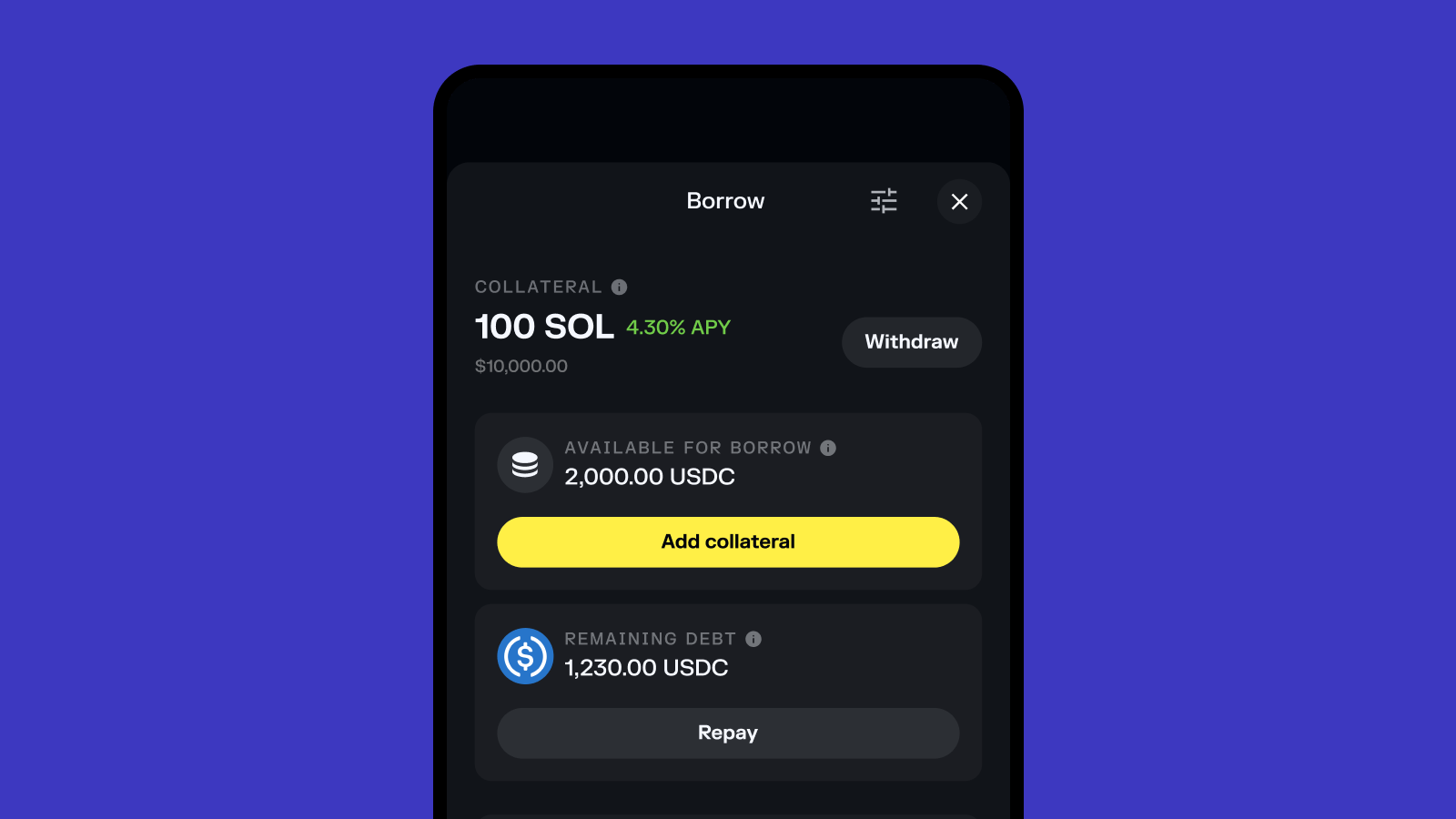
You can and should visit the app from time to time to check your position health and adjust if necessary.

Track your position health (it matters!)

When you use SOL as collateral, your borrowing power depends on the value of that SOL.

Solflare Cad Borrows dashboard

If the price of SOL changes, your position changes with it.

  • If SOL goes up → your position becomes healthier
  • If SOL goes down → your position becomes tighter

That’s why it’s important to keep an eye on your position health in the app

Solflare shows this clearly using simple indicators, so you can quickly understand where you stand without needing to interpret technical metrics.

Adjust at any time

You can always go back into the app to:

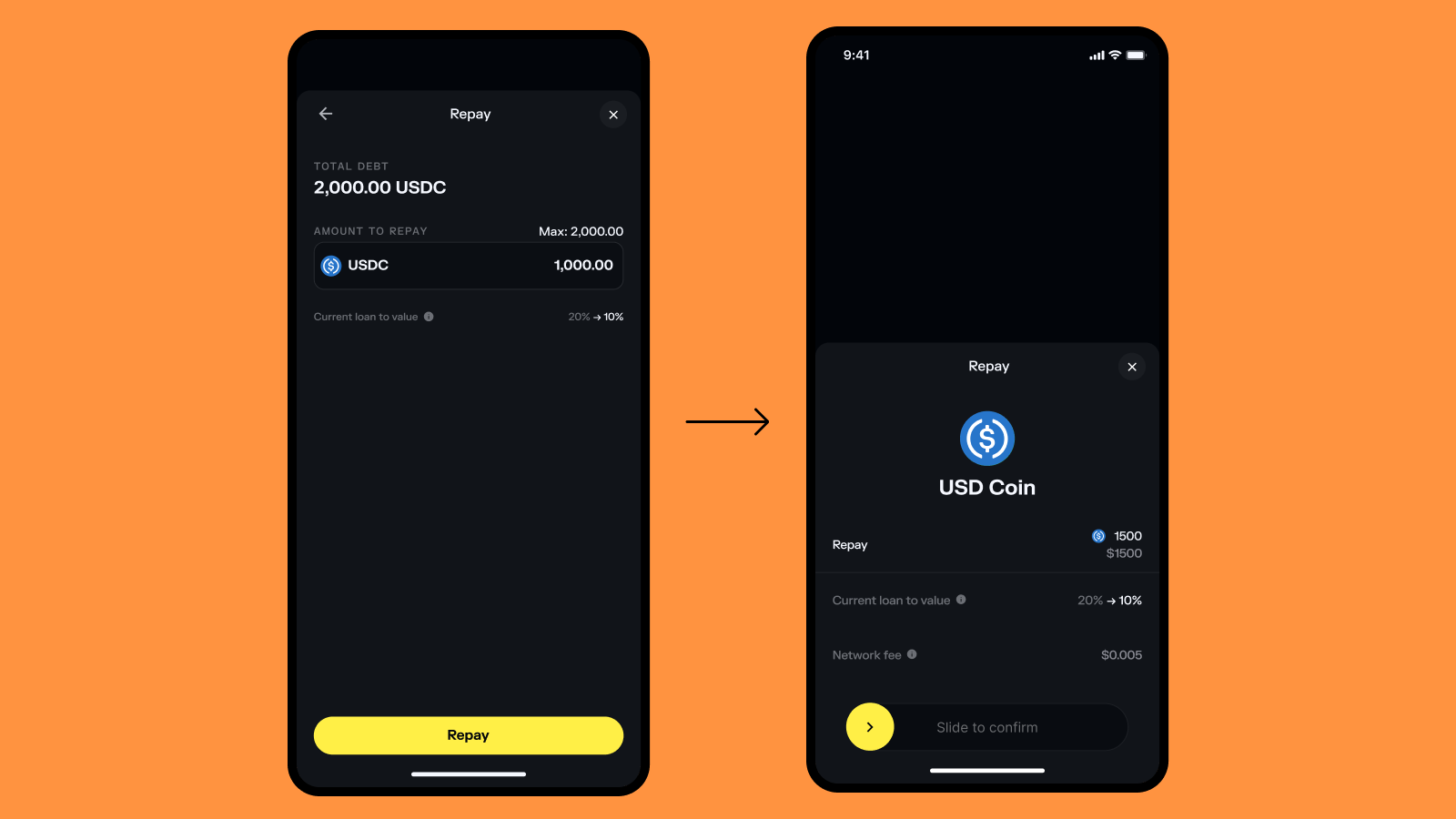
  • repay borrowed USDC (partially or fully)

Adjust at any time visual

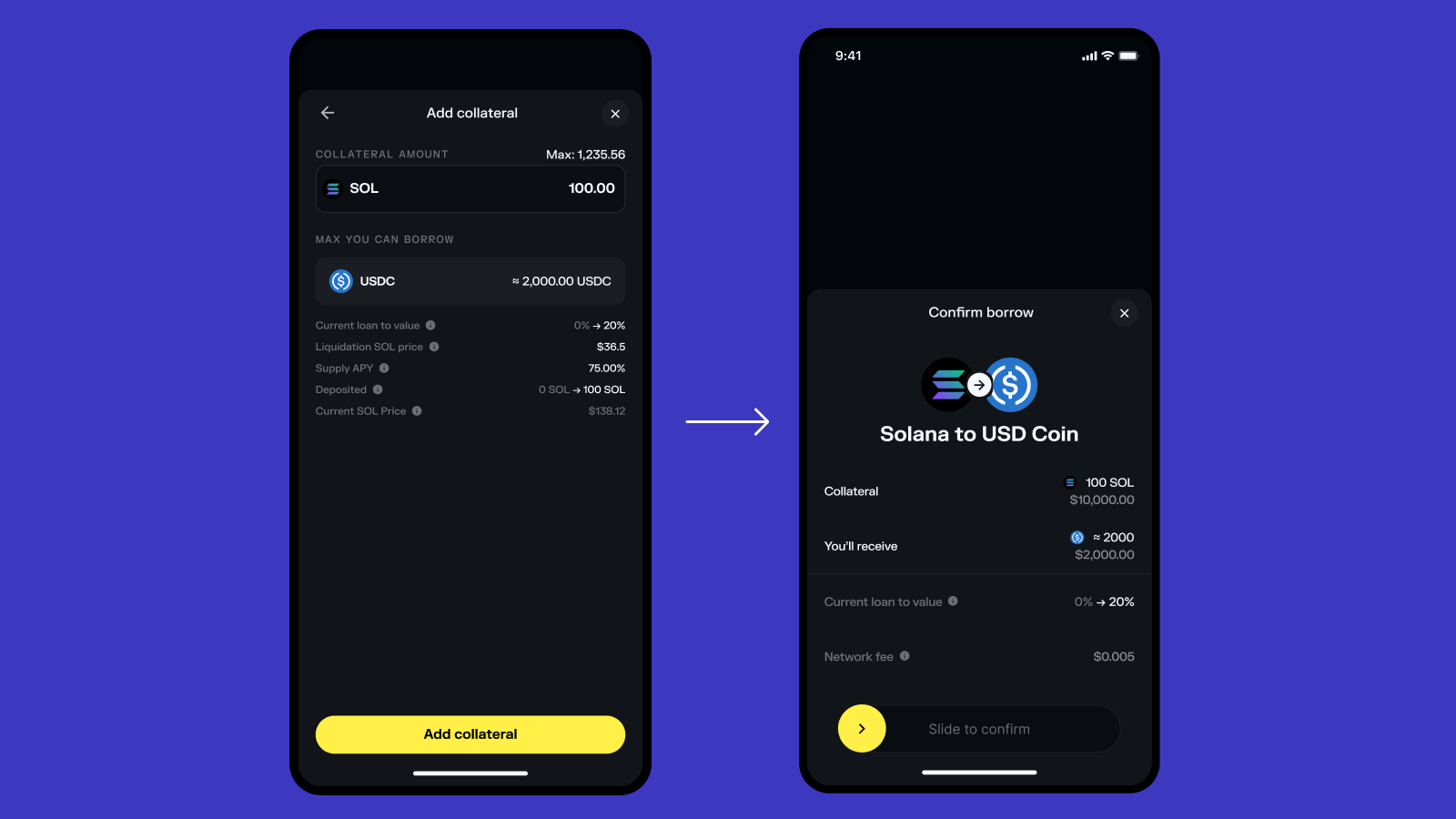
  • add more collateral

Adjust at any time visual

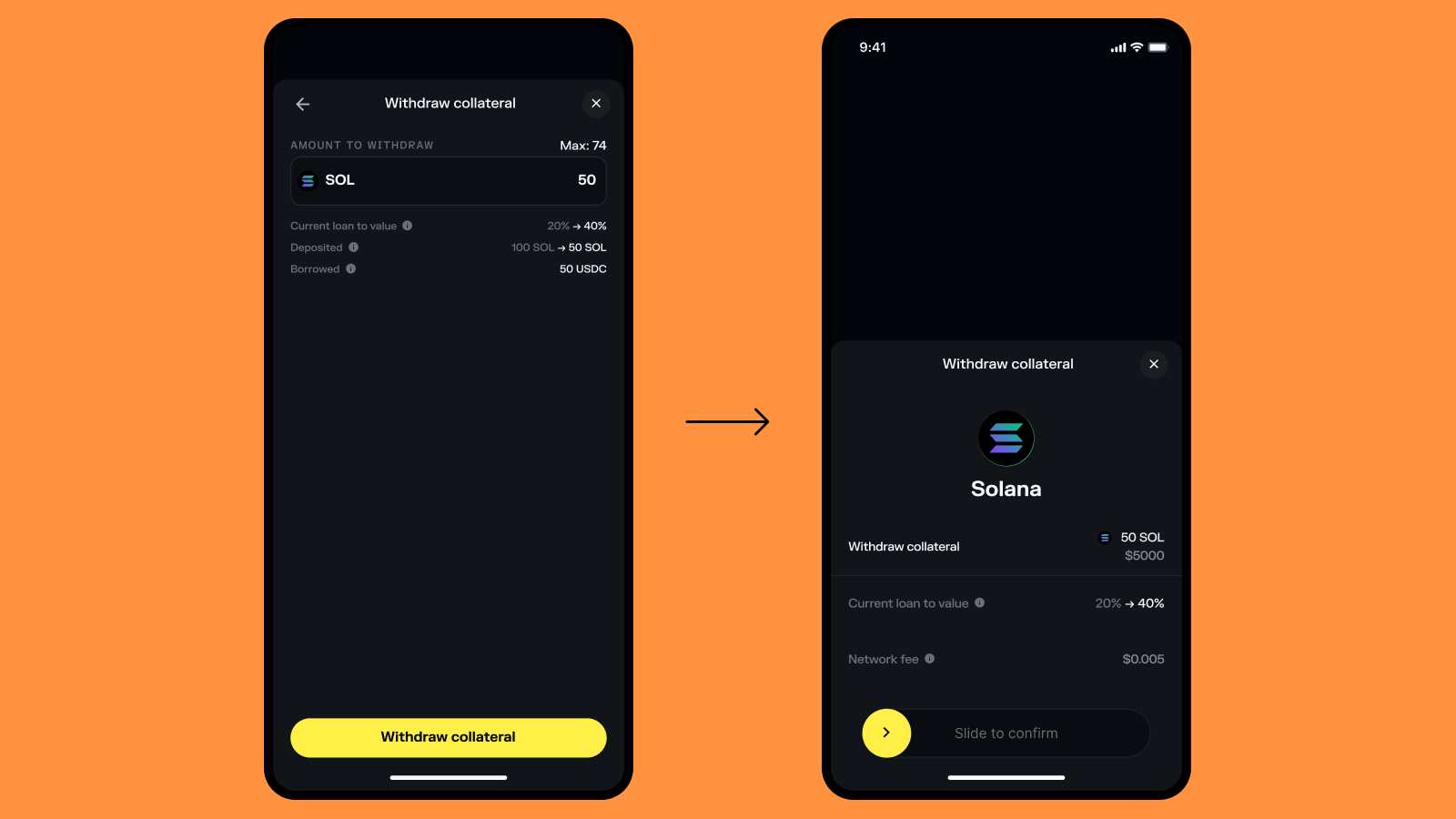
  • withdraw collateral (if your position allows it)

Adjust at any time visual

Everything is visible and managed from the app.

Keep in mind: Borrowing against collateral carries risk, including liquidation if your position health drops below the required threshold. Supply and borrow APY rates are variable. This is not financial advice.

Where to Go From Here

If you’ve been holding SOL for a while, you’ve probably had moments where you needed liquidity but didn’t want to sell.

That’s exactly the gap Card Borrow is designed to fill.

Instead of choosing between keeping your position and covering everyday expenses, you can do both — hold your SOL and still use your card when you need it.

The setup is simple, and once it’s in place, everything happens in the background.

You don’t need to think about borrowing or managing multiple steps. You just use your card as usual.

If you’re curious how it feels in practice, the easiest way to understand it is to try it with a small amount and see how it works.

Get your Solflare Card and pay anywhere

Pay with USDC directly from your wallet (even when you don't have it), at over 100 million locations worldwide!

FAQs

Do I pay interest if I’m not using my card?

No.

Interest only applies to the amount of USDC you’ve actually used. If you haven’t made any purchases, there’s no borrowing and no interest.

How much can I borrow against my SOL?

You can choose how much you want to borrow relative to your collateral, typically between 10% and 50%.

This means if you deposit SOL, you decide what portion of its value you’re comfortable using for spending.

What happens if the price of SOL goes down?

If the value of your SOL drops, your collateral health decreases.

If it falls too much, you may need to:

  • add more SOL as collateral
  • repay part of your borrowed USDC

Solflare shows your position health clearly so you can monitor it and take action if needed.

What happens if my position becomes too risky?

If the value of your SOL drops and your borrowing level gets too high, your position can become unhealthy.

In that case, part of your collateral may be automatically sold to cover the borrowed amount and bring the position back to a safe level.

This is a standard mechanism used in systems where assets are used as collateral.

Solflare helps you avoid this by showing your position health clearly in the app and providing visual indicators so you can take action early — like adding more collateral or repaying part of what you’ve used.

Can my position get liquidated?

If the loan-to-value reaches 75% of the value of your collateral (set by Kamino, typically ~75% LTV), your position may be liquidated to cover the debt.

Do I need to use another app or protocol?

No.

Even though Card Borrow is powered by Kamino, everything is handled directly inside the Solflare app.

You don’t need to create an account or interact with anything outside your wallet.

Can I still earn yield on my SOL?

Yes.

Your SOL can earn a variable supply yield while it’s being used as collateral. This is powered by Kamino and depends on market conditions.

Can I repay what I’ve borrowed at any time?

Yes.

You can repay your borrowed USDC at any time, either partially or in full, directly from the Solflare app.

Can I withdraw my SOL whenever I want?

You can withdraw your SOL as long as your position remains within a healthy range.

If you have an outstanding balance, you may need to repay part of it before withdrawing.

Is this the same as taking a loan?

Not exactly.

Instead of taking a fixed loan upfront, Card Borrow only accesses USDC when you spend. There’s no idle debt — borrowing happens dynamically based on your card usage.

Who is this feature best for?

Card Borrow is especially useful for:

  • SOL holders who don’t want to sell
  • users who want to keep their position during market downturns
  • people who want to use their crypto more actively without converting it

Is there any risk to using Card Borrow?

Like any system that uses collateral, there is some risk.

If the value of your SOL drops significantly and your borrowing level is too high, your position can become unhealthy.

This is why it’s important to:

  • keep a buffer
  • monitor your position
  • start with conservative settings

Disclaimer: Solflare is a non-custodial wallet: you alone control your private keys and assets at all times. We never take custody of, hold, or have access to your funds. All borrowing, lending, and transaction decisions are made and executed solely by you.Borrowing against collateral carries risk, including liquidation if your position health drops below the required threshold. Supply and borrow APY rates are variable. This is not financial advice.

Share this guide: